
How to Automate Purchase Orders: From Reorder Point to PO, Step by Step
By Faisal Khan
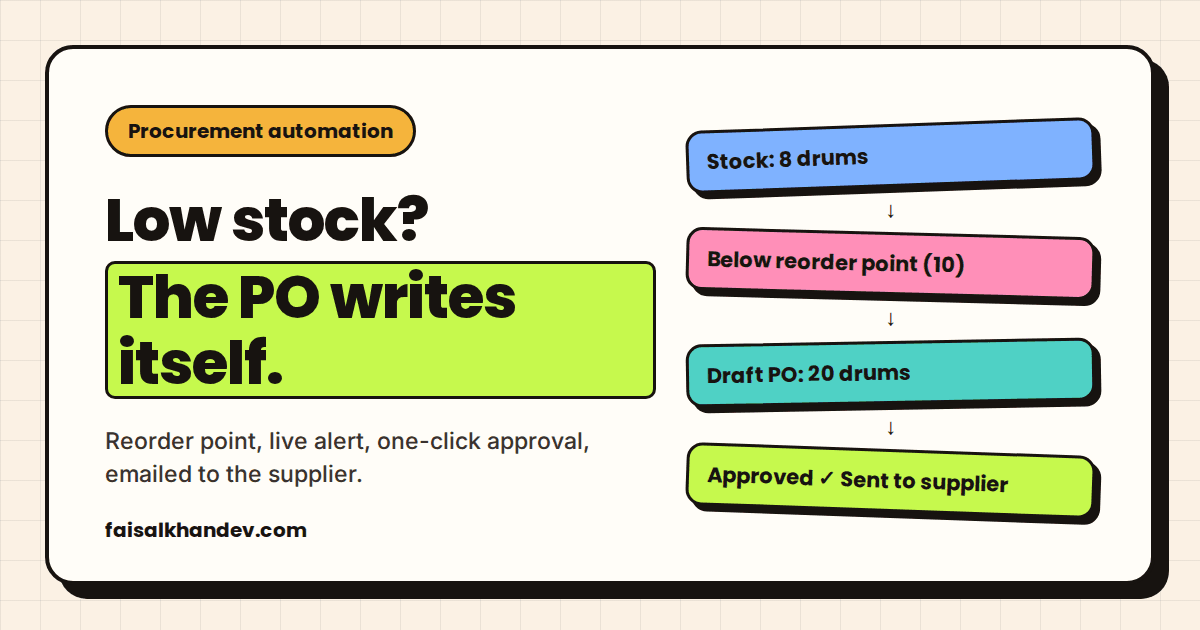
Distributors rarely run out of stock because nobody cares. They run out because the person who notices is also packing orders, answering the phone and chasing a late payment. To automate purchase orders properly, you take the noticing off that person's plate. Stock gets watched all day. A draft order appears the moment it's needed, and a human still decides whether it goes out.
This is the exact flow I built into a production ERP for an industrial lubricants distributor. Here's how it works, step by step, and how to set up the same thing in your own business.
What is purchase order automation?
Purchase order automation is a system that watches live stock levels, detects when a product falls below a set minimum, suggests how much to reorder, and builds a formal purchase order from that suggestion for a person to approve and send. Purchase order automation replaces the manual loop of checking stock, writing a PO and emailing a supplier.
The core of it is the reorder point: the stock level that triggers a reorder. Wikipedia's entry on safety stock gives the standard formula: average demand during the supplier's lead time, plus a safety buffer. Microsoft's Business Central documentation puts it more plainly: a reorder point represents demand during lead time, and when inventory is projected to pass below it, it's time to order more.
The second number is the reorder quantity: how much to buy when the trigger fires. Set both per product, and the rest of the system is mostly plumbing.
Off-the-shelf ERPs that already automate purchase orders
Most mainstream ERPs already ship some version of reorder rules. If you pay for one, switch that feature on before you build anything.
- Odoo has reordering rules. You set a minimum and maximum per product. When forecasted stock falls below the minimum, Odoo creates a replenishment order, or in manual mode lists it for someone to review.
- Microsoft Dynamics 365 Business Central offers reordering policies such as Fixed Reorder Qty. and Maximum Qty., and its planning system suggests purchase orders when projected stock crosses the reorder point.
- Shopify lets you create purchase orders in the admin to record what you order from suppliers: products, quantities, costs, payment terms and supplier details.
So the idea isn't new. What varies is how well it fits the way your business actually counts and buys stock. Lubricant and chemical distributors buy in drums and totes, track batches, and work with pre-negotiated supplier prices. That's where a generic setup starts needing workarounds, and where I've written separately about when a custom ERP makes sense for chemical and paint distributors and when it doesn't.
How reorder point automation works in a real distributor
Reorder point automation works as a chain of four steps: a rule, a trigger, an approval and a send. Here's the chain as it runs in the ERP I built for a lubricants distributor, using one product, a synthetic compressor oil sold in drums.
Step 1: set the reorder point
The supplier takes two weeks to deliver a new batch, and an empty shelf for two weeks means dealer orders the distributor can't fill. So the procurement team sets a rule in the ERP for this oil: if stock drops below 10 drums, flag it and suggest ordering 20.
Ten is the reorder point. Twenty is the reorder quantity. Nobody has to remember either number again.
Step 2: the stock drops and the alarm goes off
It's a busy week. Dealer orders go out, and the warehouse scans 4 drums of the oil out of inventory. The ERP tracks this in real time, so stock moves from 12 drums to 8 the moment the scans land.
Eight is below ten. The reorder logic fires straight away and an alert appears on the procurement manager's dashboard: this oil is low, recommended action: order 20 drums.
No one ran a report. No one opened a spreadsheet on a Friday afternoon and discovered the problem three days too late.
Step 3: a human approves, the ERP writes the PO
The ERP knows the oil is needed. The supplier doesn't. And the manager can't just phone and say "send oil"; she needs an official, trackable financial document.
She reviews the suggestion, checks the budget, and clicks Generate PO. The ERP builds a formal purchase order with the distributor's billing details, the exact product spec, the pre-negotiated price per drum and the delivery date.
Step 4: the PO goes to the supplier
The ERP emails the purchase order directly to the supplier. Nobody attaches a PDF, retypes a price or wonders which version of the template is current.
Four steps. One of them needs a person, and that person spends their time on the decision rather than the paperwork.
Why purchase orders shouldn't send without approval
For most distributors, a draft PO plus a one-click approval gives you nearly all of the time saving and keeps a person on the spend.
I feel fairly strongly about this one. A fully automatic PO sounds impressive in a demo. Then a scanning mistake or a one-off bulk order trips the rule, and twenty drums arrive that nobody wanted, on a supplier invoice nobody can easily cancel. The approval step is where someone notices that the dip was a single big customer order, or that the budget is tight this month, or that a cheaper batch is coming next week.
The ERP does the watching, the maths and the formatting. The human does the judgement. That split is the whole design.
Where AI fits in purchase order automation
AI is not what triggers the reorder, and I'd be wary of anyone who says it should be. The reorder logic in the flow above is plain rules: a number, a comparison, a suggested quantity. Rules are predictable, easy to audit and easy to explain to an accountant.
Where AI earned its place in this ERP was answering questions. Staff can ask the internal chatbot things like "how many drums of the compressor oil do we have?" and get the live number from the ERP's own database, instead of opening the inventory screen or asking whoever is nearest the warehouse.
That's a small thing that adds up. Sales can answer a dealer on the phone without putting them on hold. Procurement can sanity-check an alert before approving it. And because the chatbot reads the real data rather than guessing, the answer is the same number the dashboard shows.
Manual purchase orders vs automated purchase orders
Here's the difference step by step. Most of the gain comes from the first two rows, not the last.
| Step | Manual process | Automated process |
|---|---|---|
| Knowing stock is low | Someone checks a spreadsheet or walks the warehouse, when they have time | Live stock count compared against the reorder point on every movement |
| Deciding how much to order | Guesswork or memory of last time | Reorder quantity set per product, suggested in the alert |
| Writing the PO | Copying product codes, prices and addresses into a template | PO built from stored supplier, spec and pre-negotiated price |
| Approval | Often skipped, or done over chat with no record | One click by the procurement manager after reviewing the suggestion |
| Sending to the supplier | Attach a PDF to an email and hope it's the right version | Emailed by the system from the approved PO |
| Answering "do we have it?" | Ask the warehouse, wait for a call back | Ask the stock chatbot, get the live number |
How to automate purchase orders in your business
You can follow these steps whether you switch on reorder rules in an existing ERP or build them into a custom system.
- List the products that actually hurt when they run out. Start with those, not the whole catalogue, and get them right first.
- Measure the supplier lead time for each one. Use real delivery history, not the number on the supplier's website.
- Set a reorder point and reorder quantity per product. Demand during the lead time, plus a buffer for bad weeks. Revisit them every quarter.
- Make sure stock counts are live. If stock only updates at the end of the day, the alert arrives late. Scanning items out as they ship is what makes the trigger reliable.
- Store supplier details and agreed prices with each product. That's what lets the system write a correct PO without anyone retyping it.
- Keep one approval click before anything is sent. Then let the system email the PO and log it.
If you'd rather have this built around how your warehouse already works, it's the core of my AI automation for distributors and online stores work. The same system is also available as a scoped build under Distributor ERP.
Do I need an ERP to automate purchase orders?
You need three things more than you need an ERP: live stock counts, a reorder rule per product, and stored supplier details and prices. Most ERPs bundle all three. A spreadsheet can hold the rules but rarely the live counts, which is why spreadsheet-based reordering usually catches shortages late.
What happens if stock keeps dropping before the order arrives?
A good system counts stock that is already on order, so it does not raise a second purchase order for the same shortage. Odoo, for example, triggers its reordering rules from forecasted stock, which includes incoming quantities. Without that, every new scan below the reorder point would suggest another order.
What should an automated purchase order include?
An automated purchase order should include your billing details, the supplier, the exact product and specification, the quantity, the agreed price per unit and the expected delivery date. Those fields make it a trackable financial document rather than an informal request, and they are what the supplier needs to fulfil it.
Is reorder point automation the same as AI inventory forecasting?
No. Reorder point automation applies fixed rules: when stock falls below a set number, suggest a set quantity. AI forecasting tries to predict demand from history and trends. Rules are simpler to trust and audit, so most distributors should run them first and only consider forecasting once the basics are reliable.
Where to start
Automating purchase orders comes down to one idea: let the system watch stock and write the paperwork, and keep a person on the decision. Start with your most painful products, set honest reorder points, and make stock counts live. If you want help working out whether your current system can do this or needs a custom build, get in touch.