
AI-Powered File Utility Platform
- Client
- SaaS Product
- Duration
- Solo project
- Built with
- Next.js, TypeScript, Prisma, NextAuth, PostgreSQL, sharp, FFmpeg, OpenAI API, Google Gemini, Hugging Face, CloudConvert, Resend
- Live site
- Visit site (opens in new tab)
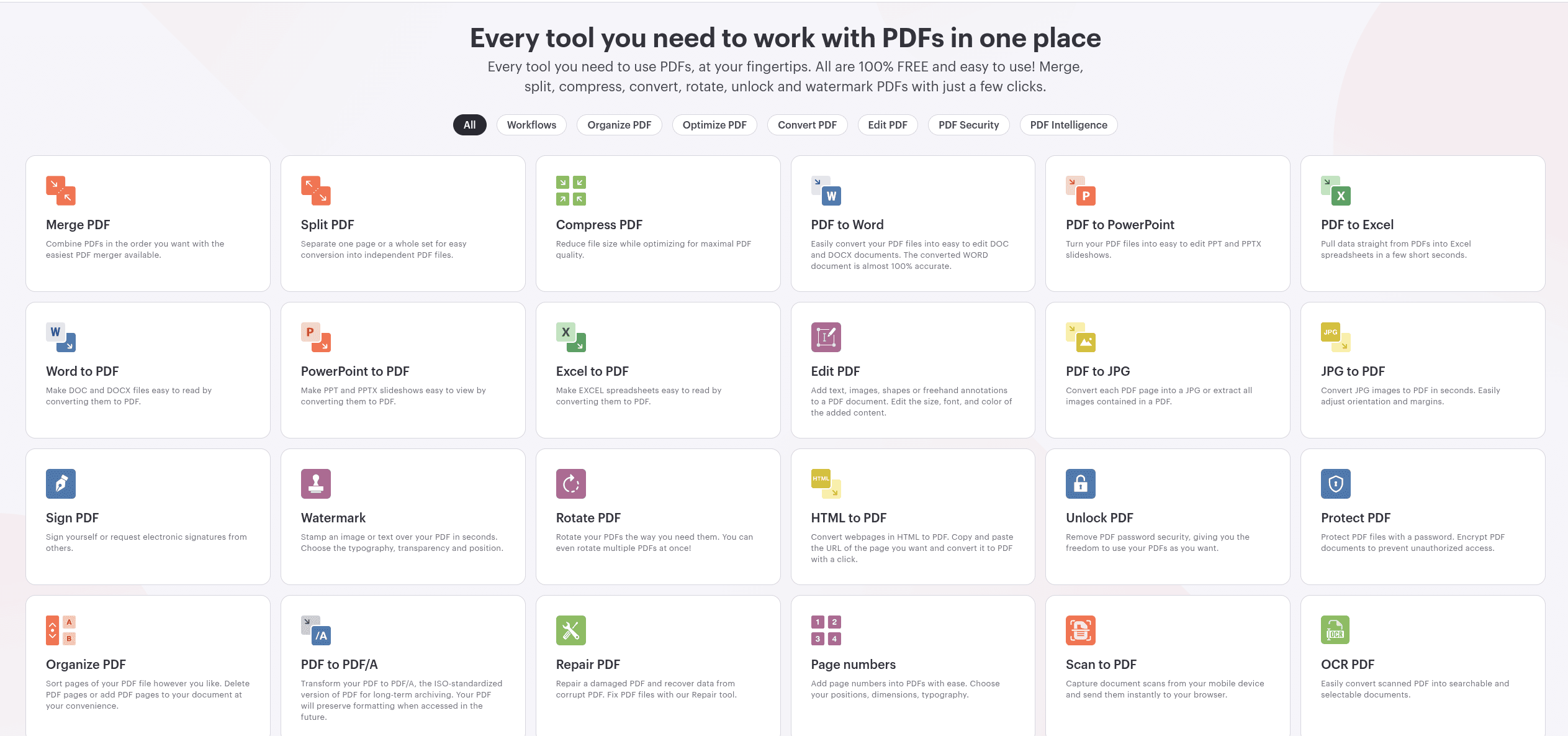
An AI file conversion platform is a web app that combines format conversion — image, PDF, video, document — with AI-powered tools like writing, chat, and image generation, all under one account, instead of forcing users across a dozen separate single-purpose converter sites. This one was built solo, end to end: over 250 individual tool pages covering file format conversion, image editing, PDF manipulation, video/audio conversion, and a set of AI writing and chat tools. The goal was breadth with real functionality behind every tool, not a marketing page listing features that don't exist yet.
Scope
- Image tools — format conversion across every practical pairing (HEIC, PSD, EPS, TIFF, WebP, AVIF, SVG, GIF, PNG, JPG), plus compression, resize, crop, background removal, upscaling, colorization, object/watermark removal, and AI image generation
- PDF tools — compress, annotate, edit, extract text/images, and convert to and from Word, Excel, PowerPoint, EPUB, MOBI, AZW3, and more
- File tools — CSV, Excel, XML, and JSON cross-conversion and splitting
- Video/audio tools — format converters, subtitle generation, audio extraction, and YouTube transcript pulling
- AI writing tools — content summarizer, cold email writer, grammar fixer, AI text detector, translator, business plan generator, and an "explain like I'm five" tool
- AI chat — a general assistant tool alongside the file utilities
Architecture
- Next.js App Router with Prisma + PostgreSQL for the data layer and NextAuth (credentials + OAuth, JWT sessions, email verification flow) for accounts
- Heavy processing work — image compression, format conversion — runs through Server Actions calling sharp and FFmpeg directly rather than routing through a separate backend service
- Client-side image tools also use ffmpeg.wasm for in-browser video conversion where server round-trips aren't worth it
AI and third-party APIs wired in
Real, working integrations rather than SDKs sitting unused in package.json:
- OpenAI API — AI writing tools, AI detection, and the chat assistant
- Google Gemini — a second AI provider for select generation tasks
- Hugging Face Inference API — model-backed image tasks
- CloudConvert — file formats that need a dedicated conversion engine rather than a library (legacy formats like VSD/VSDX, PSD, EPS)
- Resend — transactional email (verification, password reset)
Engineering notes
- Every image/PDF/video tool is its own route rather than one generic "convert" page with a format dropdown — better for SEO and lets each tool page explain exactly what it does
- Mixed processing strategy: server-side (sharp/FFmpeg) for heavier or format-sensitive work, client-side (ffmpeg.wasm) where avoiding a large file upload round-trip mattered more than server compute
- Full auth system (registration, email verification, password reset, JWT sessions via Prisma adapter) built to support free-tier and account-gated tools under one platform rather than making every tool anonymous
What is an AI file conversion platform?
An AI file conversion platform combines traditional format conversion (image, PDF, video, document) with AI-powered tools like writing, chat, and image generation under a single account, instead of splitting the work across separate converter and AI sites. This one runs 250+ tools behind one login, with conversion handled by the same backend (sharp, FFmpeg, CloudConvert) rather than proxying to a different service per tool.
What makes an all-in-one file utility platform different from single-purpose converters?
The value is having one account and one interface instead of ten different converter sites, each with their own ads, upload limits, and quality. This platform runs 250+ tools — image, PDF, video, and file conversion plus AI writing and chat — behind a single login, with format conversion handled by the same backend (sharp, FFmpeg, CloudConvert) rather than proxying to a different service per tool.
Why combine AI writing tools with file conversion tools in the same product?
Because the actual user overlap is real: someone converting a PDF to extract text often also needs it summarized or rewritten right after. Building both under one platform means the AI tools (OpenAI, Gemini, Hugging Face-backed) can work directly on files a user already uploaded for conversion, instead of forcing a download-then-reupload workflow across two separate tools.
Why use multiple AI providers instead of just one?
Reliability and cost. OpenAI, Google Gemini, and Hugging Face each get used where they're strongest — OpenAI for writing and chat, Gemini as a second generation option, Hugging Face for model-backed image tasks — rather than routing every request through a single provider that becomes a bottleneck or a single point of failure if it goes down or gets expensive at scale.